Posts

NSX-T Configuration from Scratch
Image
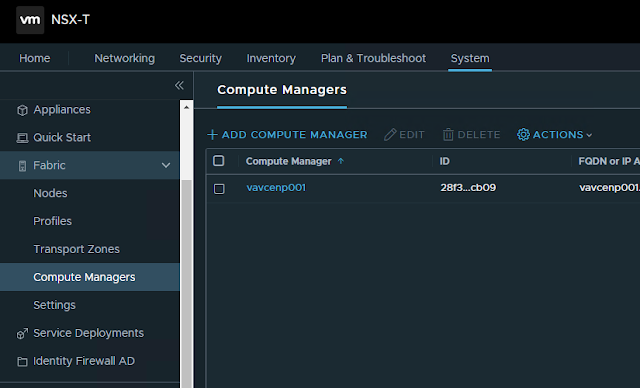
 In this blog post we'll see step by step configuration of NSX-T 1. Add Compute Manager 2. Create Transport Zones as following      a. One Overlay Transport Zone for Host and Edge Transport Nodes      b. Two VLAN Transport Zones. One for Host Transport Nodes and another for Edge Transport Node. (having two separate VLAN transport zones is not necessary, a single VLAN Transport Zone can be used Host and Edge Transport zones) 3. Create Uplink profile for Host Transport Node      In our design, we are using LAG consisting of two uplink on Host Transport Nodes. LAG is already created on vCenter ESXi hosts. Transport VLAN is the VLAN used for Host TEP IP address pool. There is no need to specify the MTU size in Host Uplink Profile, as we are using converged VDS in our design and MTU settings need to configured in VDS (on vCenter).     MTU Settings on VDS 4. Create IP pool for Host Transport Nodes. In our case, we would be using DHCP...

Export or Backup Azure Virtual Networks or Subnet information into CSV using PowerShell

 There may be times when you  want to get a report that contains information of all VNETS along with their subnets and address prefixes. You might have question, how to export or backup Azure VNET or subnets information into CSV.  This script will export Azure Virtual Network information along with subnets and address prefixes of all Active subscriptions into a CSV.

Automating a PowerShell Script using Azure Automation Account

So you have have created a PowerShell script to run a job quickly, but now you want to automate that PowerShell Script at a scheduled interval. For this you can use Azure Automation account where you can add you PowerShell script as a runbook and schedule that runbook at a desired time interval. In addition to the script that you have created, you also need to add some additional lines to make Automation account use a connection. Also note that if your script is performing some action (read or write) on any other subscription where the automation account is created, then you'll have to grant Automation Account's Runas account, the access of other subscriptions (You can refer the Microsoft article here. )

Export or Backup Azure Network Security Groups into CSV using PowerShell

There could be many use cases where you may want to export Network Security Groups into CSV. You might have question, how to export or backup Azure Network Security Groups into CSV. Here is the PowerShell script that you can use to export Azure Network Security Groups into CSV using PowerShell script. This script will export Network Security Group along with rules of all Active subscriptions into a CSV.

Export or Backup Azure Route Table into CSV using PowerShell

Image
 There could be many use cases where you may want to export Azure route tables into CSV. Here is the PowerShell script that you can use to export Azure Route Tables into CSV using PowerShell script. This script will export Azure Route Tables along with routes of all Active subscriptions into a CSV.

F5 BigIP – Setting up Virtual Server with SSL offload

Image
 In this post we'll be setting up a VIP with a backend pool of three nodes. We have details of backend node IP addresses, which are given by developer team, and VIP address is allocated/secured by us. In our last post, we looked at F5 BigIP Initial Setup and Configuration . First thing first, so lets create an A record in DNS for application FQDN pointing to Virtual Server IP address.

F5 BigIP Initial Setup and Configuration

Image
 In this blog post we'll setup and configure a standalone F5 Application Delivery Controller (commonly referred as load balancer). We'll be using a BigIP VM appliance for this lab. Before we begin, we should have following information handy. BIG-IP base registration key Internal/External self IP address, netmask, and default gateway IP address on the management route

Ansible-Playbook to display output of multiple show commands (using stdout_lines with Loop)

 In this playbook, we we'll see how we can get display of multiple show commands in stdout_lines format. We can make use of loops (or with_items) for submitting multiple commands, but debug output with stdout_lines does not gives the formatted result as it would give for single command. So in case of multiple commands, we can debug the output of each command separately in stdout_lines format.

DNS Terminologies and Definitions

Image
DNS terminology is complex and confusing, so much so that not just one, but two RFC's have been written just trying to clear up what each term means (RFC 8499 and RFC 7719). Below are the terms: 1. FQDN - FQDN stands for Fully Qualified Domain Name, which is the complete domain name for a host on the Internet. The FQDN has two parts: the hostname, and the domain name. e.g. in foo.example.com, foo is the hostname, and example.com is the domain name.

Map Microsoft Azure and AWS services to Google Cloud Products

If you have already worked on Azure Cloud or AWS and now you are moving or expanding your cloud to Google, then you might want to see what the former cloud service providers' services translate to in Google Cloud. So here you can get the answer. Map Microsoft Azure services to Google Cloud Products https://cloud.google.com/docs/compare/azure#service_comparisons Map  AWS services to Google Cloud Products https://cloud.google.com/docs/compare/aws#service_comparisons

Understanding VMware NSX Control Plane

In this post we'll discuss about NSX control plane in detail. I'll describe the  NSX controllers and functions along with NSX Controller workload distribution. We'll also identify the user world agent in the control plane and the control plane component interactions. NSX Control Plane The NSX Control plane runs in the VMware NSX Controller cluster. NSX Controller is an advanced distributed state management system that provides control plane functions for NSX logical switching and routing functions. It is the central control point for all logical switches within a network and maintains information about all hosts, logical switches (VXLANs), and distributed logical routers.

Transport Zone and Transport Node in VMware NSX-T

Image
Transport Zones A transport zone controls which hosts a logical switch can reach. It can span one or more host clusters also known as transport nodes. If two transport nodes are in the same transport zone, VMs hosted on those transport nodes can be attached to the NSX logical switch segments that are also in that transport zone. If VMs are attached to switches that are in different transport zones, the VMs cannot communicate with each other. A Transport Zone defines a collection of hosts that can communicate with each other across a physical network infrastructure. VM communication between different hosts within the same TZ happens over one or more interfaces defined as a Tunnel End Point (TEP). VM communication to a physical network happens using logical routers and not TEP.

Azure PowerShell Commands for Listing Network Configuration

While working on Azure, PowerShell can be your friend when you need some information quickly, live and that is not visible in Azure Portal. Following are few of the commands that can be helpful for a network administrator working on Azure. List all virtual network subnets by using PowerShell Get-AzureRmVirtualNetwork -Name <My-vnet-name> -ResourceGroupName <vnet-resource-group-name> | Get-AzureRmVirtualNetworkSubnetConfig | Format-Table

Azure ExpressRoute Physical and Logical Topology

Image
If you are asked to explain physical and logical connectivity of Azure Express Route circuit by looking into the portal, It might be little confusing, if you are not familiar with Azure Portal. So here is the network diagram showing physical and logical connectivity of Express Route setup.  A single express Route Direct circuit has built-in redundancy with two links, that extends from On-Premise with redundant routers to Azure Cloud with redundant Virtual Network Gateways, through redundant routers in Connectivity Partner Location.

Ansible Playbook for Network OS Upgrade with pre and post checks

You have 100s of network switches or routers that you need to upgrade. How much time would it take for you to do the upgrades? There are a lot number of sub-tasks involved while upgrading IOS image of a Cisco router or a switch. This time of upgradation can be reduced through automation from various Enterprise Configuration Management tools that also have ability to upgrade network OS. Though these tools give an easy to use graphical interface, but this requires you to have appropriate license and also restricts you to customize your upgrade process.

Ansible to Configure DHCP IP-Helper Address on Multiple Devices

In this post we'll be configuring ip-helper address on multiple devices using Ansible. We'll be defining the interfaces to be configured for different devices in host_vars. In ansible, host-specific variables can be defined in the host_vars sub-directory either in the home directory of user executing ansible play or in /etc/ansible. Each file/directory in the host_vars sub-directory is name after the host it represents, e.g. host variable for device router-01 are stored in either ~/host_vars/router-01 or /etc/ansible/host_vars/router-01

VMware NSX Logical Routing

In this post we will discuss the current challenges with data center routing and the evolution of router placement. Current Challenges in Data Center Routing Current data centers are an agglomeration of several generations of networking and security products. Today's data center networking team faces significant challenges: Manual, complex provisioning of hardware devices and agents Limited placement, mobility, and efficiency due to silos VLAN sprawl, firewall rule sprawl, and static IP inflexibility Several networking and security blind spots Performance choke points due to traffic hairpinning Lack of seamless, instant integration with cloud management platforms and applications

Interface Tracking to Remove Static Route from Routing Table

In this blog post we'll see how to monitor an interface for its status based on which a static route can be tracked. The static route will be removed from routing table when the interface goes down Create tracking object RTR#conf t RTR(config-track)# track 10 interface loopback 101 line-protocol RTR(config-track)# delay down 5 up 10 RTR(config-track)# exit In the above commands, delay indicates that the tracking will wait for 5 seconds after the interface goes down before updating the tracking status as down. And it will wait for 10 seconds after the interface comes up before making the tracking object as up.

VMware NSX Traffic Flow — East-West & North-South

Image
Understanding how traffic is flowing in NSX environment is an important aspect to successfully maintain and troubleshoot networks having NSX. In this post we'll understand hop-by-hop flow of traffic in East-West and North-South directions. East-West: VMs on Same Subnet, Same Host VM-1 has IP address 172.16.20.6 and VM-2 has IP address 172.16.20.7 VM-1 vNIC è Logical Switch (Segment ID 5002) è VM-2 vNIC

NSX-T Architecture | Overview of NSX-T Management, Control, and Data Plane

Image
NSX-T Manager NSX-T utilizes a multi-tiered networking stack. The NSX Management Cluster is a 3 node high availability cluster. The cluster consists of a converged Management (Policy) & Control Plane cluster services. The NSX management nodes each contain a Management plane, a central control plane, a policy role and a replicated desired state datastore. The NSX Management Cluster provides availability of all management services and increased performance. The converged appliance allows for easier operations with less systems to monitor and maintain.